March 2010 Archives

Posterous has added the ability to register a domain, setup a Posterous blog connect to Google Apps with just a couple clicks.
With our new domain purchasing feature, let us take care of the geeky details --- all you have to do is choose your desired address and we'll register your site and link it to your Posterous in just a few steps. After you've purchased your own domain, we also make it super easy to set up your own personalized email boxes, calendars, and wikis using Google Apps.

It's not especially cheap, but it's even more drop-dead simple than it was before!
1 year - $24.99/year
2 years - $19.99/year 
(20% discount)
5 years - $15.99/year 
(36% discount)
10 years - $12.99/year 
(48% discount)

Additional Features
ID Theft Protection
$10.00/year

This beats WordPress.com and Blogger deals in terms of simplicity and reblogging/lifestreaming.  Combining this with the advanced theming allows pros the benefits of more advanced hosting providers and solutions.  I'm almost ready to make the complete switch.

The domain registration is in partnership with eNom.com.

via blog.posterous.com

Permalink | Leave a comment  »

Posterous has added the ability to register a domain, setup a Posterous blog connect to Google Apps with just a couple clicks.
With our new domain purchasing feature, let us take care of the geeky details --- all you have to do is choose your desired address and we'll register your site and link it to your Posterous in just a few steps. After you've purchased your own domain, we also make it super easy to set up your own personalized email boxes, calendars, and wikis using Google Apps.

It's not especially cheap, but it's even more drop-dead simple than it was before!
1 year - $24.99/year
2 years - $19.99/year 
(20% discount)
5 years - $15.99/year 
(36% discount)
10 years - $12.99/year 
(48% discount)

Additional Features
ID Theft Protection
$10.00/year

This beats WordPress.com and Blogger deals in terms of simplicity and reblogging/lifestreaming.  Combining this with the advanced theming allows pros the benefits of more advanced hosting providers and solutions.  I'm almost ready to make the complete switch.

The domain registration is in partnership with eNom.com.

via blog.posterous.com

Permalink | Leave a comment  »

I was catching up on my Google Reader feeds on my iPod touch today and noticed a new option when I had tapped to open an item.

Previously, tapping to open an item meant you either had to flick to the next item or tap the item title and then select the new item to view. The addition of Next Item means I no longer have to add a second tap to select a new item or flick (and for some feeds with full content, flick and flick) to go to the item.  That's way cool and a huge time saver for feeds that include the full post (rather than an excerpt)!

Permalink | Leave a comment  »

I was catching up on my Google Reader feeds on my iPod touch today and noticed a new option when I had tapped to open an item.

Previously, tapping to open an item meant you either had to flick to the next item or tap the item title and then select the new item to view. The addition of Next Item means I no longer have to add a second tap to select a new item or flick (and for some feeds with full content, flick and flick) to go to the item.  That's way cool and a huge time saver for feeds that include the full post (rather than an excerpt)!

Permalink | Leave a comment  »

The new pricing model mirrors deals the two publishers struck with Apple for the iPad earlier this year. Under what is called the "agency model," some new best sellers will be priced at $9.99, but most will be priced at $12.99 to $14.99. Many older titles will be priced at less than $9.99.

"Our digital future is more assured today than it was two months ago," said Brian Murray, chief executive of HarperCollins Publishers. Mr. Murray said the deal with Amazon followed a month of negotiations. He added that he felt the agreement was "fair" for both sides.

They had a much dimmer digital future now than before the Kindle came out. eBooks have been around for a long time (Peanutpress became Palm Reader which became eReader). I started reading eBooks on my first Handspring Visor in 2000. The publishing industry wasn't very concerned (or interested) in the market.

It's funny how a successful product (and lessons learned by the RIAA) can revise the party line and spark "me too!" deals.

Permalink | Leave a comment  »

The new pricing model mirrors deals the two publishers struck with Apple for the iPad earlier this year. Under what is called the "agency model," some new best sellers will be priced at $9.99, but most will be priced at $12.99 to $14.99. Many older titles will be priced at less than $9.99.

"Our digital future is more assured today than it was two months ago," said Brian Murray, chief executive of HarperCollins Publishers. Mr. Murray said the deal with Amazon followed a month of negotiations. He added that he felt the agreement was "fair" for both sides.

They had a much dimmer digital future now than before the Kindle came out. eBooks have been around for a long time (Peanutpress became Palm Reader which became eReader). I started reading eBooks on my first Handspring Visor in 2000. The publishing industry wasn't very concerned (or interested) in the market.

It's funny how a successful product (and lessons learned by the RIAA) can revise the party line and spark "me too!" deals.

Permalink | Leave a comment  »

Great article on The Apple Blog how sync and backup are not the same thing.

Unfortunately, syncing operates under the age-old computer principle of Garbage In Garbage Out. When syncing is working properly, a change made on one device is propagated to the web and to all other devices. If that change was unintended, the service might have a previous revision, but don’t count on it. A problem with data on one device is copied to all other devices in your sync scheme.

This is all too true. Dropbox is great in that it keeps the versions for the last 30 days (or forever as a paid upgrade). In the event of a conflict, both versions are kept. They also have update tracking which makes it easy to see what machine made what changes and when.

These same concerns also hold true for your calendars and contacts from MobileMe. Even though you sync them to the cloud, you should still perform a local backup of your Address Book and iCal.

That's a big one. Mobile Me doesn't have previous version recovery, change tracking, or notification when something goes wrong. It recently deleted a contact, and I didn't realize it for two weeks. Since Mobile Me contacts are also used for the iPhone, that can be a problem when you need to call your Aunt Margaret to thank her for the hideous sweater that doesn't fit.

I did have a copy from an offline backup, but it took awhile (and too much effort) to extract just the one contact.

Permalink | Leave a comment  »

Great article on The Apple Blog how sync and backup are not the same thing.

Unfortunately, syncing operates under the age-old computer principle of Garbage In Garbage Out. When syncing is working properly, a change made on one device is propagated to the web and to all other devices. If that change was unintended, the service might have a previous revision, but don’t count on it. A problem with data on one device is copied to all other devices in your sync scheme.

This is all too true. Dropbox is great in that it keeps the versions for the last 30 days (or forever as a paid upgrade). In the event of a conflict, both versions are kept. They also have update tracking which makes it easy to see what machine made what changes and when.

These same concerns also hold true for your calendars and contacts from MobileMe. Even though you sync them to the cloud, you should still perform a local backup of your Address Book and iCal.

That's a big one. Mobile Me doesn't have previous version recovery, change tracking, or notification when something goes wrong. It recently deleted a contact, and I didn't realize it for two weeks. Since Mobile Me contacts are also used for the iPhone, that can be a problem when you need to call your Aunt Margaret to thank her for the hideous sweater that doesn't fit.

I did have a copy from an offline backup, but it took awhile (and too much effort) to extract just the one contact.

Permalink | Leave a comment  »

Google Chrome Dev channel release was updated today. Extensions are finally available in Incognito. That's awesome, because, let's face it, Adblock is needed just as much (if not more) for Incognito sites.

Permalink | Leave a comment  »

Google Chrome Dev channel release was updated today. Extensions are finally available in Incognito. That's awesome, because, let's face it, Adblock is needed just as much (if not more) for Incognito sites.

Permalink | Leave a comment  »

I'm a big fan of PortableApps.com. It can be a lifesaver when traveling or using someone else's computer. There wasn't a good way to check all the version numbers and keep them up to date, however.

This slick utility shows you the version number you have, the current version number, and gives you the ability to download and install the updates.

Portable Software Updater will help you keep your portable software up-to-date. No need to open each program's webpage every day, waste time visiting the download page, wait for the download process to finish, copy it to your portable apps folder and run it. Portable Software Updater is a freeware program that can help you skip all these steps with just one click!


Permalink | Leave a comment  »

I'm a big fan of PortableApps.com. It can be a lifesaver when traveling or using someone else's computer. There wasn't a good way to check all the version numbers and keep them up to date, however.

This slick utility shows you the version number you have, the current version number, and gives you the ability to download and install the updates.

Portable Software Updater will help you keep your portable software up-to-date. No need to open each program's webpage every day, waste time visiting the download page, wait for the download process to finish, copy it to your portable apps folder and run it. Portable Software Updater is a freeware program that can help you skip all these steps with just one click!


Permalink | Leave a comment  »

Vista and Windows 7's Snipping Tool is great and a welcome improvement from PrintScr, but it comes up short when you're writing documentation or when you need to annotate a screenshot.

I'm in love with FastStone Capture. In addition to having much better control of what's captured than native Windows or the Snipping tool, it has an image editor that makes annotating the screen captures effortless (including boxes, arrows, and "blurring"). From there you can copy the screen capture to the clipboard, save it, email it and so much more.

It's incredibly lightweight and very unobtrusive. There's even a portable version that's perfect for a thumb drives.

FastStone Capture is $19.95 for a lifetime license.

Permalink | Leave a comment  »

Vista and Windows 7's Snipping Tool is great and a welcome improvement from PrintScr, but it comes up short when you're writing documentation or when you need to annotate a screenshot.

I'm in love with FastStone Capture. In addition to having much better control of what's captured than native Windows or the Snipping tool, it has an image editor that makes annotating the screen captures effortless (including boxes, arrows, and "blurring"). From there you can copy the screen capture to the clipboard, save it, email it and so much more.

It's incredibly lightweight and very unobtrusive. There's even a portable version that's perfect for a thumb drives.

FastStone Capture is $19.95 for a lifetime license.

Permalink | Leave a comment  »

The Kindle for Mac app is a good start, but it's lacking some key features.  In addition to the inability to search or add notes and marks, it lacks multitouch (which, ironically, is available in the PC version).

You can easily add multitouch using the excellent (and free) BetterTouchTool.
  1. Add the Kindle for Mac application to the application list.
  2. Switch to the Touchpad tab.
  3. Add a new gesture.
  4. Select the Touchpad gesture Three Finger Swipe Left.  This will be the "next page" gesture.
  5. Select Arrow Right for the Custom Keyboard Shortcut.
  6. Add a second gesture.
  7. Select the Touchpad gesture Three Finger Swipe Right.  This will be the "previous page" gesture.
  8. Select Arrow Left for the Custom Keyboard Shortcut.

You can now swipe left and right to go to the next and previous page.  The two finger scroll gesture is still active, so pay attention when you swipe to avoid going too far forward or back!

Permalink | Leave a comment  »

The Kindle for Mac app is a good start, but it's lacking some key features.  In addition to the inability to search or add notes and marks, it lacks multitouch (which, ironically, is available in the PC version).

You can easily add multitouch using the excellent (and free) BetterTouchTool.
  1. Add the Kindle for Mac application to the application list.
  2. Switch to the Touchpad tab.
  3. Add a new gesture.
  4. Select the Touchpad gesture Three Finger Swipe Left.  This will be the "next page" gesture.
  5. Select Arrow Right for the Custom Keyboard Shortcut.
  6. Add a second gesture.
  7. Select the Touchpad gesture Three Finger Swipe Right.  This will be the "previous page" gesture.
  8. Select Arrow Left for the Custom Keyboard Shortcut.

You can now swipe left and right to go to the next and previous page.  The two finger scroll gesture is still active, so pay attention when you swipe to avoid going too far forward or back!

Permalink | Leave a comment  »

Amazon released a beta of the Kindle application for Macs.  While the Kindle functions are great, one nice side benefit is bringing a Mobipocket reader to the Mac platform. It won't handle locked Mobi files, but it works great for Mobipocket without DRM.

Checkout Fictionwise, Feedbooks, and ManyReads and Scribd for more Mobi downloads.

Permalink | Leave a comment  »

Amazon released a beta of the Kindle application for Macs.  While the Kindle functions are great, one nice side benefit is bringing a Mobipocket reader to the Mac platform. It won't handle locked Mobi files, but it works great for Mobipocket without DRM.

Checkout Fictionwise, Feedbooks, and ManyReads and Scribd for more Mobi downloads.

UPDATE: I should mention that this only works on Mobipocket books without DRM.

Permalink | Leave a comment  »

ZoomIt is screen zoom and annotation tool for technical presentations that include application demonstrations. ZoomIt runs unobtrusively in the tray and activates with customizable hotkeys to zoom in on an area of the screen, move around while zoomed, and draw on the zoomed image.

Where have you been all my life! This is a perfect utility for drawing on a PowerPoint presentation or any screen and is ideal for webinars where the audience can't see a laser pointer. I especially like the ability to add arrows and boxes. Its break countdown is a fantastic touch.  I'll use this in all my classes from now own.  This is definitely going on my thumbdrive.

Permalink | Leave a comment  »

ZoomIt is screen zoom and annotation tool for technical presentations that include application demonstrations. ZoomIt runs unobtrusively in the tray and activates with customizable hotkeys to zoom in on an area of the screen, move around while zoomed, and draw on the zoomed image.

Where have you been all my life! This is a perfect utility for drawing on a PowerPoint presentation or any screen and is ideal for webinars where the audience can't see a laser pointer. I especially like the ability to add arrows and boxes. Its break countdown is a fantastic touch.  I'll use this in all my classes from now own.  This is definitely going on my thumbdrive.

Permalink | Leave a comment  »

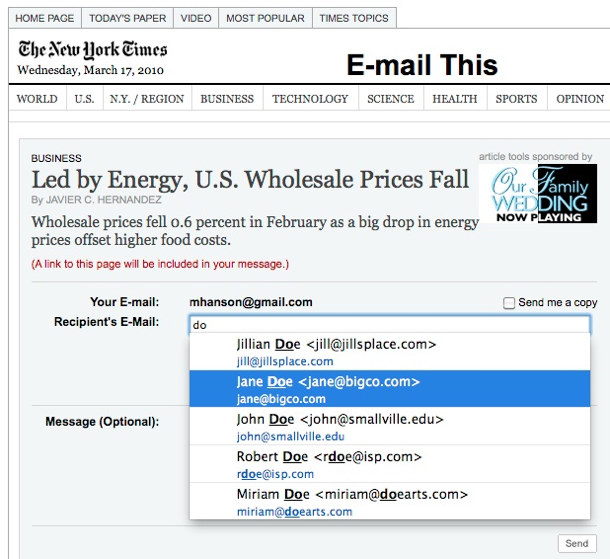
Thanks to this, you can now import all your Gmail contacts to the local database and use this contact info to autocomplete forms anywhere on the web. You can also import data about your Twitter friends and if you are on a Mac, you can import your local address book as well. Contacts will also import avatars from Gravatar whenever they are available.

contacts autocomplete on new york times

After installing the addon, you can test both the autocomplete and the tool's export features here.

Very cool idea. I can definitely the possibilities. I've Gone Google to Chrome, but I know I'll play with this sooner than later.

Permalink | Leave a comment  »

Thanks to this, you can now import all your Gmail contacts to the local database and use this contact info to autocomplete forms anywhere on the web. You can also import data about your Twitter friends and if you are on a Mac, you can import your local address book as well. Contacts will also import avatars from Gravatar whenever they are available.

contacts autocomplete on new york times

After installing the addon, you can test both the autocomplete and the tool's export features here.

Very cool idea. I can definitely the possibilities. I've Gone Google to Chrome, but I know I'll play with this sooner than later.

Permalink | Leave a comment  »

It almost doesn’t matter if Google’s Chrome browser and OS gain significant market share or not, as long as they push other browsers and operating systems to keep up in the speed race. Google’s need for speed boils down to one very simple thing: money. It realized long ago that every millisecond improvement in pageload times on its search engine resulted in more searches, and thus more search ads served and clicked on. The opposite is also true. Google once did a study showing that delays of 100 to 400 millisecond in showing search results translated into up to 0.6 percent searches. Multiply that across the billions of searches done on Google and it starts to add up to real money, perhaps tens of millions of dollars per quarter.

No wonder Google tries to do everything it can to make the Web faster. For instance, it is supporting emerging standards such as HTML5 and SPDY, and sharing its best practices and speed-monitoring tools with developers. It is also baking the PuSH protocol into Google Reader and other apps. In doing so, Google is helping to deliver news feeds faster (PuSH, aka Pubsubhubbub, was created by two Google engineers, of course, and released as an open-source project). The list goes on and on.

Interesting take on Google and their speed obsession. It really doesn't matter why Google wants to make things faster. It does serve Google in several ways.

  • They keep their technical edge and force other companies to innovate (like Microsoft and h#mce_temp_url#).
  • It's great PR.
  • It helps them keep their market share by being so darn fast.
  • Google loves their data. The more searches (and clickthrus), the more data. The more data, the better the search results and their algorithms.
Does it improve their bottom line? Sure. Are they purely altruistic? Nope. (They just won't be evil.)

Permalink | Leave a comment  »

It almost doesn’t matter if Google’s Chrome browser and OS gain significant market share or not, as long as they push other browsers and operating systems to keep up in the speed race. Google’s need for speed boils down to one very simple thing: money. It realized long ago that every millisecond improvement in pageload times on its search engine resulted in more searches, and thus more search ads served and clicked on. The opposite is also true. Google once did a study showing that delays of 100 to 400 millisecond in showing search results translated into up to 0.6 percent searches. Multiply that across the billions of searches done on Google and it starts to add up to real money, perhaps tens of millions of dollars per quarter.

No wonder Google tries to do everything it can to make the Web faster. For instance, it is supporting emerging standards such as HTML5 and SPDY, and sharing its best practices and speed-monitoring tools with developers. It is also baking the PuSH protocol into Google Reader and other apps. In doing so, Google is helping to deliver news feeds faster (PuSH, aka Pubsubhubbub, was created by two Google engineers, of course, and released as an open-source project). The list goes on and on.

Interesting take on Google and their speed obsession. It really doesn't matter why Google wants to make things faster. It does serve Google in several ways.

  • They keep their technical edge and force other companies to innovate (like Microsoft and h#mce_temp_url#).
  • It's great PR.
  • It helps them keep their market share by being so darn fast.
  • Google loves their data. The more searches (and clickthrus), the more data. The more data, the better the search results and their algorithms.
Does it improve their bottom line? Sure. Are they purely altruistic? Nope. (They just won't be evil.)

Permalink | Leave a comment  »

With Microsoft RemoteFX, users will be able to work remotely in a Windows Aero desktop environment, watch full-motion video, enjoy Silverlight animations, and run 3D applications – all with the fidelity of a local-like performance when connecting over the LAN. Their desktops are actually hosted in the data center as part of a virtual desktop infrastructure (VDI) or a session virtualization environment (formerly known as Terminal Services). With RemoteFX, these users will be able to access their workspace via a standard RDP connection from a broad range of client devices – rich PCs, thin clients and very simple, low-cost devices.

Also today, we announced a collaboration agreement with Citrix, which will enable Citrix to integrate and use Microsoft RemoteFX within its XenDesktop suite of products and HDX

I've been critical of VDI implementations thus far because of the degradated user experience. Having a VDI experience with full Aero, full-motion video, and significantly improved graphics performance will go a long way to bridge the gap between a VDI and desktop experience.

Permalink | Leave a comment  »

With Microsoft RemoteFX, users will be able to work remotely in a Windows Aero desktop environment, watch full-motion video, enjoy Silverlight animations, and run 3D applications – all with the fidelity of a local-like performance when connecting over the LAN. Their desktops are actually hosted in the data center as part of a virtual desktop infrastructure (VDI) or a session virtualization environment (formerly known as Terminal Services). With RemoteFX, these users will be able to access their workspace via a standard RDP connection from a broad range of client devices – rich PCs, thin clients and very simple, low-cost devices.

Also today, we announced a collaboration agreement with Citrix, which will enable Citrix to integrate and use Microsoft RemoteFX within its XenDesktop suite of products and HDX

I've been critical of VDI implementations thus far because of the degradated user experience. Having a VDI experience with full Aero, full-motion video, and significantly improved graphics performance will go a long way to bridge the gap between a VDI and desktop experience.

Permalink | Leave a comment  »

Google Apps Migration for Microsoft® Exchange is a new server-side tool that migrates your company's email, calendar and contact data from Microsoft Exchange to Google Apps. With the tool, migrations are:

Easy: set it up in just 4 steps
Efficient: select the combination of mail, calendar and contact data that you want to move, with the option of doing so in phases
Fast: migrate hundreds of users at the same time
Painless: employees can continue to use Microsoft Exchange during the migration without interruption or any involvement on their part

For small or ginormous organizations on Exchange 2003, it's worth a look. If you're already on Exchange 2007 or 2010, I'd stick with them for the time being. Medium-sized organizations are the tricky ones.

Permalink | Leave a comment  »

Google Apps Migration for Microsoft® Exchange is a new server-side tool that migrates your company's email, calendar and contact data from Microsoft Exchange to Google Apps. With the tool, migrations are:

Easy: set it up in just 4 steps
Efficient: select the combination of mail, calendar and contact data that you want to move, with the option of doing so in phases
Fast: migrate hundreds of users at the same time
Painless: employees can continue to use Microsoft Exchange during the migration without interruption or any involvement on their part

For small or ginormous organizations on Exchange 2003, it's worth a look. If you're already on Exchange 2007 or 2010, I'd stick with them for the time being. Medium-sized organizations are the tricky ones.

Permalink | Leave a comment  »

A new survey shows that businesses are increasingly planning their move to Windows 7, with more than half of those questioned planning to have some machines running the operating system in their corporations by the end of the year.

The survey, conducted of 923 businesses in January, found that 16 percent are already running some Windows 7, with a further 42 percent planning to start their deployment by the end of 2010.

923 does not the universe make, but it's encouraging news. Since Microsoft's announcement that Windows 7 SP1 is mostly a roll-up release (with no announced release date), CIOs should feel more comfortable going to Windows 7 sooner rather than later.

Permalink | Leave a comment  »

A new survey shows that businesses are increasingly planning their move to Windows 7, with more than half of those questioned planning to have some machines running the operating system in their corporations by the end of the year.

The survey, conducted of 923 businesses in January, found that 16 percent are already running some Windows 7, with a further 42 percent planning to start their deployment by the end of 2010.

923 does not the universe make, but it's encouraging news. Since Microsoft's announcement that Windows 7 SP1 is mostly a roll-up release (with no announced release date), CIOs should feel more comfortable going to Windows 7 sooner rather than later.

Permalink | Leave a comment  »

I've become a fan of Pinboard.in.  In particular, I love the ability to automatically create bookmarks from my Instapaper and ReadItLater lists and Twitter favorites.

Even before the Ma.gnolia debacle, I've made sure to have a redundant bookmarking system.  Diigo's a great choice. It's lesser known than Delicious, but it does tricks Delicious doesn't.

You can annotate web pages as well as save a snapshot of the page. Diigo's big on collaboration and is a hit in the Education circles.  (I'm less a fan of the collaborative annotations.)

It has extensions for Google Chrome, Firefox and IE and a most-excellent bookmarklet (the Diigolet) for everywhere else or if you want to go sans-toolbar. (The Diigolet works great on the iPhone, too.) 

To enable this cross-posting to Delicious:
  1. From Diigo go to Tools | Save to Delicious.
  2. Enter your Delicious username and password.
Every time you bookmark a site using the Diigo toolbar (or Diigolet), it's also added to your Delicious bookmarks--tags included!  (Don't worry, it doesn't add private bookmarks to Delicious.)

To then get it from Delicious to Pinboard:
  1. From Pinboard go to Settings.
  2. Add your username under Delicious "Auto-add bookmarks that appear in this del.icio.us account"
Voila! Your bookmarks are now duplicated in 3 places!

To summarize:

In Diigo, enable "Save to Delicious." In Pinboard, select "Auto-add bookmarks that appear in this del.icio.us account." 

Permalink | Leave a comment  »

Over the years, displaying recipient photographs in the Global Address List (GAL) has been a frequently-requested feature, high on the wish lists of many Exchange folks. Particularly in large organizations or geographically dispersed teams, it's great to be able to put a face to a name for people you've never met or don't frequently have face time with. Employees are commonly photographed when issuing badges/IDs, and many organizations publish the photos on intranets.

Exchange 2010 and Outlook 2010 make this task a snap, with help from AD. AD includes the Picture attribute (we'll refer to it using its ldapDisplayName: thumbnailPhoto) to store thumbnail photos, and you can easily import photos— not the high-res ones from your 20 megapixel digital camera, but small, less-than-10K-ish ones, using Exchange 2010's Import-RecipientDataProperty cmdlet.

The first question most IT folks would want to ask is— What's importing all those photos going to do to the size of my AD database? And how much AD replication traffic will this generate? The cmdlet won't allow you to import a picture larger than 10K. The original picture used in this example was 9K, and you can compress it further to a much smaller size - let's say approximately 2K-2.5K, without any noticeable degradation when displayed at the smaller sizes. If you store user certificates in AD, the 10K or smaller size thumbnail pictures are comparable in size. Storing thumbnails for 10,000 users would take close to 100 Mb, and it's data that doesn't change frequently.

This is fantastic news, as it can take the place of the directory info of an Intranet. I often rely on the GAL for phone numbers and office locations or to lookup someone if I just know their first or last name.

This means the value of the attribute isn't copied to the OAB— instead, it simply indicates the client should get the value from AD. If an Outlook client (including Outlook Anywhere clients connected to Exchange using HTTPS) can access AD, the thumbnail will be downloaded and displayed.

While it's not cached in the OAB by default, it can be done.

For true offline use, you could modify the ConfiguredAttributes of an OAB to make thumbnailPhoto a Valueattribute. After this is done and the OAB updated, the photos are added to the OAB.

That might not be good for larger organizations, but for small to medium sized ones, it might work very well.

UPDATE: MSExchange.org has a step-by-step guide.

Permalink | Leave a comment  »

  • Use @ for notebooks: Use an @ symbol followed by the name of your destination notebook
  • Use # for tags: Use a # symbol followed by the tag or tags you wish to assign. You can have multiple tags just make sure each one starts with an #

For example, Subject: Trip to Florida @travel #expense report

Would create a note titled Trip to Florida in my travel notebook, tagged with expense report.

I'm a huge fan of Evernote and rely on it everyday on a variety of devices and computers. I also frequently email to Evernote (it's great from the Blackberry). I've often wanted to tag notes as I email them, but that wasn't possible...until now.

In addition to tagging, I can even specify the destination notebook! It uses the familiar #hash and @ conventions as Twitter, so it's really easy to remember.

Permalink | Leave a comment  »

I've been using Outlook 2010 with the Google Apps Outlook sync add-in.  I noticed today that I have 3 new labels in Gmail, "Conversation Action Settings," New Feed," and "Quick Step Settings." None contain email messages.

Permalink | Leave a comment  »